


SSince 1 October 2026, salaries in Haiti follow a new law, the Code fiscal 2026. For many employees it means more money each month. For some it means less. This article explains what changed, why your payslip may not show it yet, and how to compare your own slip with the new rules using our free salary calculator.
In Haiti the document is usually called by its French name, "souche de paie". We say payslip here.
What changed on 1 October 2026
Four things matter for anyone who receives a salary:
 A new income tax scale. IRI, the income tax taken from your salary, now follows the scale in article 132 of the Code fiscal 2026.
- The CFGDCT is gone. This levy used to be withheld from salaries. It no longer is, so the line should disappear from your payslip.
- A flat 15 % on premiums and allowances. Article 103 sets this withholding on complementary pay. That includes allowances such as transport or housing that some employers used to pay with nothing withheld.
- ONA, FDU and CAS stay the same. These are the mandatory contributions for your pension (ONA), the emergency fund (FDU) and social insurance (CAS). They are still computed on your base salary.
The new rules apply to all pay received since 1 October 2026. Pay received before that date stays under the old scale.
A worked example
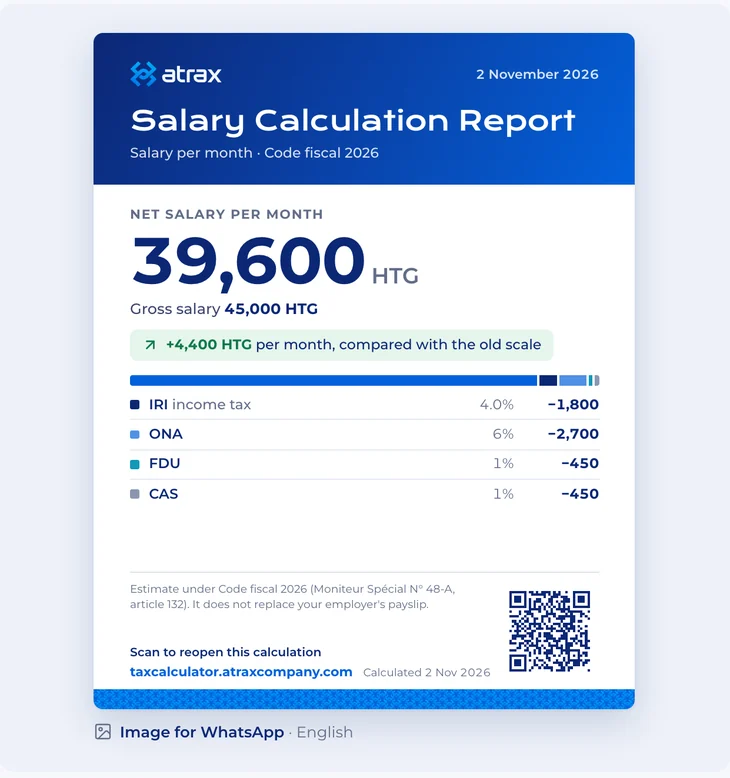
Take a gross salary of 45 000 HTG per month. Gross is the amount on the contract, before anything is withheld.
Under the Code fiscal 2026, the net salary, what you actually take home, comes to 39 600 HTG. That is 4 400 HTG more per month than under the old scale, or 52 800 HTG over twelve months.
Not everyone gains. Because of the 15 % withholding, a salary heavy in allowances can come out lower than before. If that is your case, your employer is not necessarily making a mistake: the law changed for that part of your pay too. The only way to know is to run your own figures, with your allowances included.
Why many payslips are still on the old scale
Applying a new scale is not a one-line change. Payroll systems have to be updated and tested, and many employers are still doing that work this autumn.
So if your slip still shows the old IRI, or still has a CFGDCT line, it does not mean your employer did it on purpose. Some will correct the difference on a later slip. What helps is to know your figure and to ask, calmly, when the new scale will apply.
How to check your payslip
Keep your latest payslip next to you, open the calculator and choose Check my payslip. Then follow the steps on the page, in this order:
- Choose your slip. Half-month or monthly, whichever you receive.
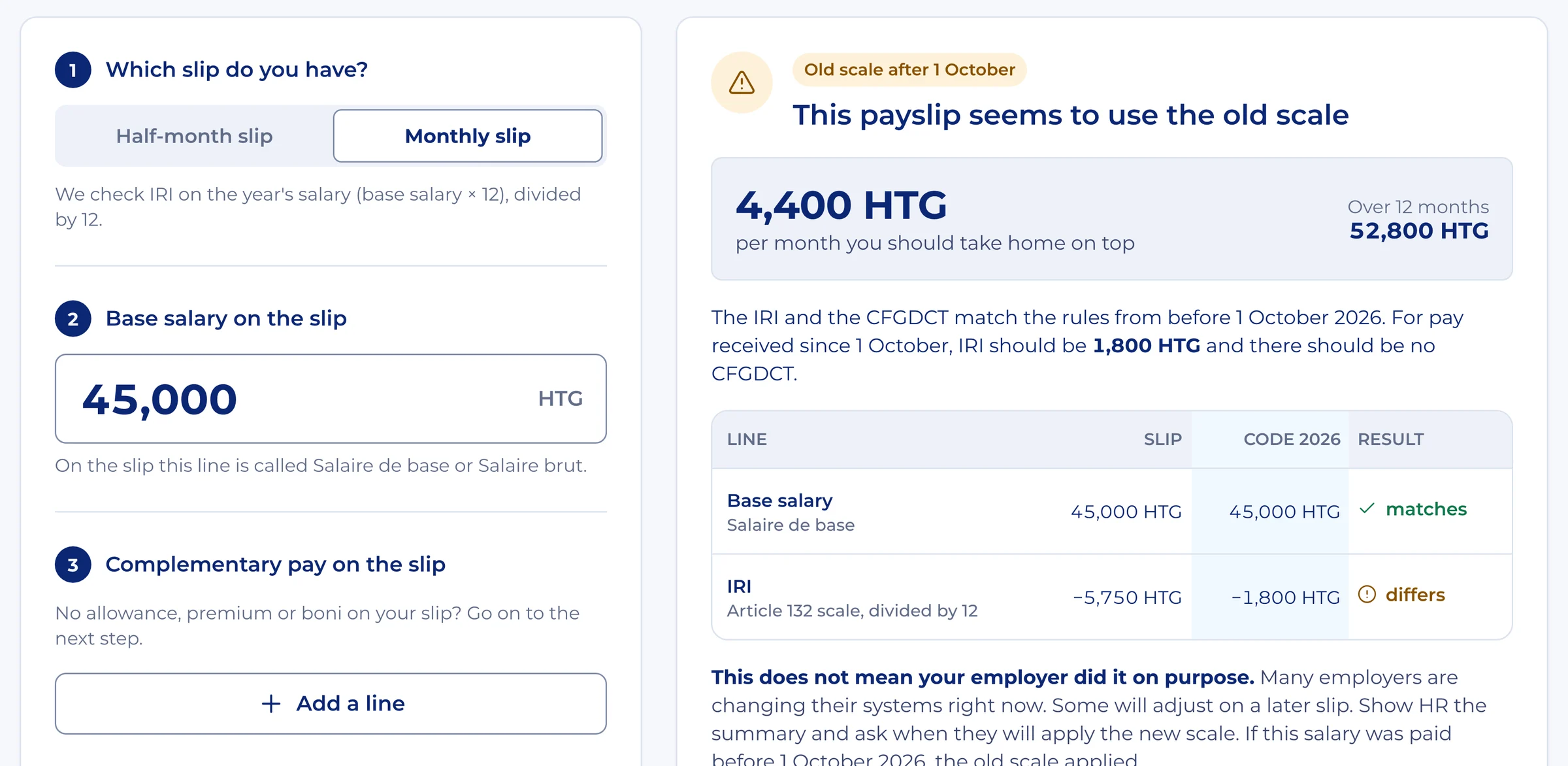
- Enter the base salary. On the slip this line is called "Salaire de base" or "Salaire brut".
- Add any complementary pay. Premiums, allowances or boni, one line each. If you have none, go on.
- Copy the withholding lines. IRI, ONA, FDU and CAS, plus CFGDCT only if your slip still has it. Leave a line empty if it is not on your slip.
- Add other deductions and the net. Other deductions, such as a loan, only lower the net. They do not change the tax.
The result updates while you type, and every line shows your slip, the new rules and whether they match. The verdict at the top takes one of three forms:
- The slip matches the Code fiscal 2026. The lines you entered follow the new rules.
- The payslip seems to use the old scale. The tool shows how much more you should take home per month and over twelve months. If this salary was paid before 1 October 2026, the old scale was the right one.
- Some lines do not match. The cause can be another calculation base, an adjustment or a typing error. Check your typing first, then ask your employer how those lines are computed.
The verdict starts a conversation; it accuses no one. The page can prepare a summary in French for your HR team, to download or to send on WhatsApp.
- 01
Copy the slip as written
Enter what the slip says, not what you think it should say.
- 02
Read the lines
Each line shows your slip, the new rules and the difference.
- 03
Take it to HR
A summary in French is ready to send to your HR team.
The whole year and the 13th-month boni
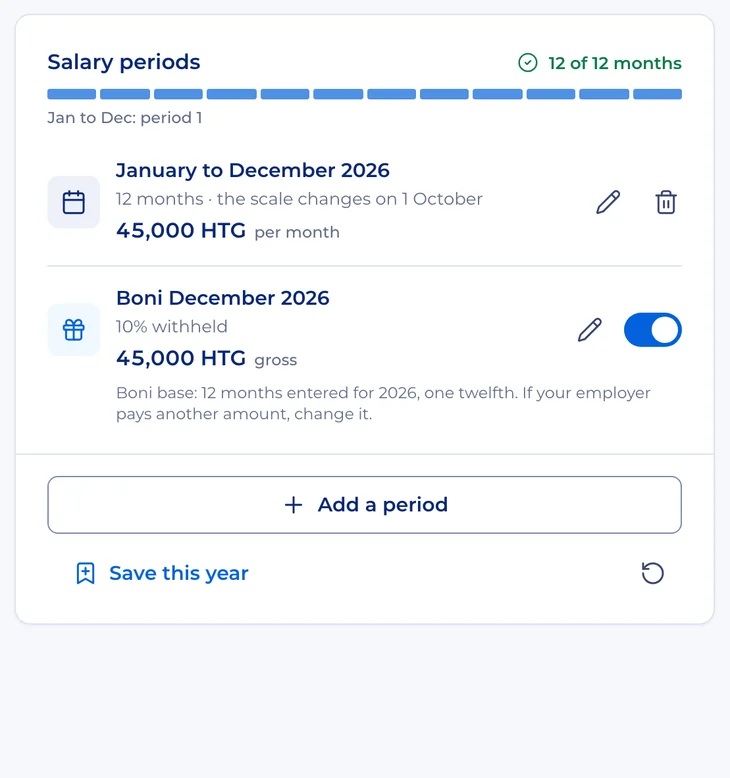
The page called The year lets you enter your salary periods, including raises, and applies the right scale to each month: the old scale through September 2026, the new one from October.
This is why your gain for 2026 will look smaller than the twelve-month figure above. Only the last months of the year fall under the new rules.
The same page handles the boni, the 13th-month payment. It takes your gross for the year and divides it by twelve. If your employer pays a different amount, you can change it. The boni keeps its own withholding rule, separate from the 15 % on premiums and allowances, and appears on its own line.
Your salary stays on your device
A salary is personal, so the calculator was built to work without seeing it. Every calculation runs on your phone or computer. Your figures are not sent to a server, and there is no account to create. Saved calculations stay on your device.
We count visits and actions anonymously, and those counts never include salary amounts. If you share a report, remember that anyone with the image or the link can see what it contains. You can turn on Hide my salary before sharing.
An estimate, not the last word
The calculator gives an estimate based on the rules of the Code fiscal 2026. It does not replace your employer's payslip. The DGI, Haiti's tax administration, or an accountant has the last word on your situation.
You can try it on your own figures at taxcalculator.atraxcompany.com. To see how we built it, read about the Haiti Salary and Tax Calculator project.

Atrax Team
The Atrax Team is a six-person group of engineers, GIS and data specialists, and designers based in Delmas, Haiti. Atrax has built digital products and field-data systems for Haitian organizations since 2015.